
VC通过读写内存实现Win7自动扫雷程序
2012-02-24 22:47:48|?次阅读|上传:wustguangh【已有?条评论】发表评论
关键词:C/C++, 游戏, MFC|来源:唯设编程网
在实际编程中,有时候需要读写其它进程的数据,使用VC的FindWindowW函数可以根据窗体类名和标题获取对应的CWnd,使用Cwind的 GetSafeHwnd可以得到对应的HWND,使用GetWindowThreadProcessId可以根据HWND获取其它进程的ID,然后根据得 到的ID使用OpenProcess函数可以打开一个外部进程,函数ReadProcessMemory可以读取指定进程的内存数 据,mouse_event可以模拟鼠标事件,本文通过实际的源码介绍了VC读写系统其它进程内存数据的方法。
首先给出具体的实现效果:
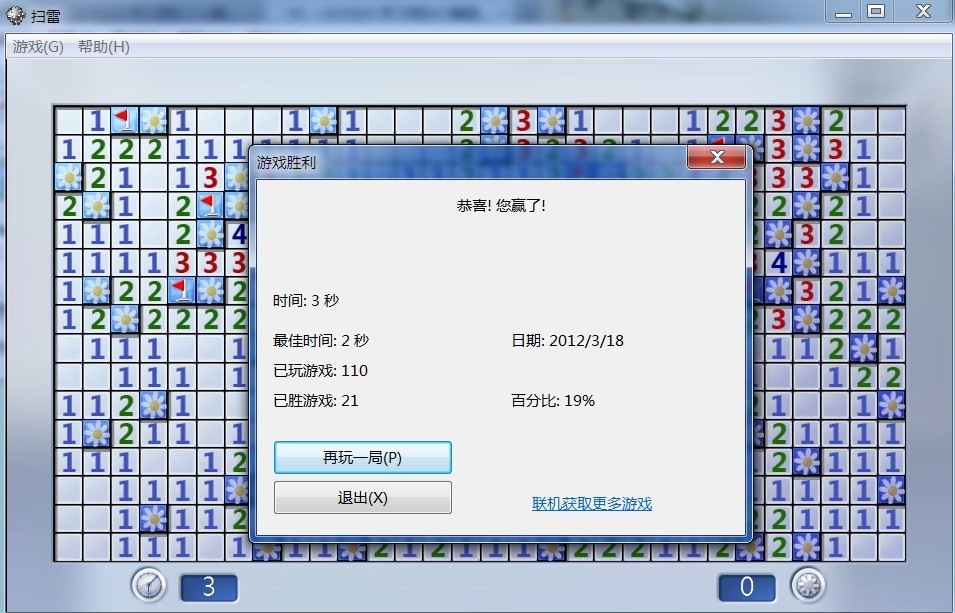
程序的界面如下:
1、定义扫雷进程的类名和窗体标题:
	TCHAR szCaption[128] = _T("扫雷");//window title
	TCHAR className[128]=_T("Minesweeper");
	GetDlgItem(IDC_EDIT5)->SetWindowTextW(szCaption);
	GetDlgItem(IDC_EDIT4)->SetWindowTextW(className);
2、与Win7扫雷进程进行连接的按钮事件:
void CMemSearchDlg::OnBnClickedButton2()
{
    CString className;    //类名
    CString szCaption;    //窗体标题
    GetDlgItem(IDC_EDIT4)->GetWindowTextW(className);
    GetDlgItem(IDC_EDIT5)->GetWindowTextW(szCaption);
    pWnd = FindWindowW(className, szCaption);
    if(pWnd!=NULL&&pWnd->GetSafeHwnd()){
        GetWindowThreadProcessId(pWnd->GetSafeHwnd(),&m_pID);
        g_hProcess=::OpenProcess(PROCESS_ALL_ACCESS,FALSE,m_pID);
        if (g_hProcess==NULL)
        {
            CString str;
            str.Format(_T("OpenProcess失败,GetLastError=%d
"),GetLastError());
            MessageBox(str,_T("错误"),0);
        }else{
            GetDlgItem(IDC_BTNSEARCH)->EnableWindow(true);
            GetDlgItem(IDC_BUTTON1)->EnableWindow(true);
            GetDlgItem(IDC_BTNSEARCH5)->EnableWindow(true);
            GetDlgItem(IDC_BTNSEARCH6)->EnableWindow(true);
            if(className==_T("Minesweeper"))
                GetDlgItem(IDC_BTN_AUTO)->EnableWindow(true);
        }
    }else
        MessageBox(_T("链接游戏窗口失败!"),_T("错误"),0);
}
与Win7扫雷进程进行连接主要通过FindWindowW方法实现,FindWindow可以通过窗体的类名和标题获取对应的CWnd,然 后使用GetWindowThreadProcessId获取对应的PID,在根据获取的PID调用::OpenProcess打开扫雷进程。
【发表评论0条 】
网友评论(共?条评论)..
VC通过读写内存实现Win7自动扫雷程序

 CATIA/CAA
 SWING
SWING MFC
MFC Unity3D
 Android
 JQuery
 ASP.NET