
C#自定义网格组件(DataGridView)实现数据分组、排序
2012-05-01 23:59:39|?次阅读|上传:wustguangh【已有?条评论】发表评论
3. 完成自定义网格组件的相关功能:
首先介绍自定义网格组件的类设计框架:
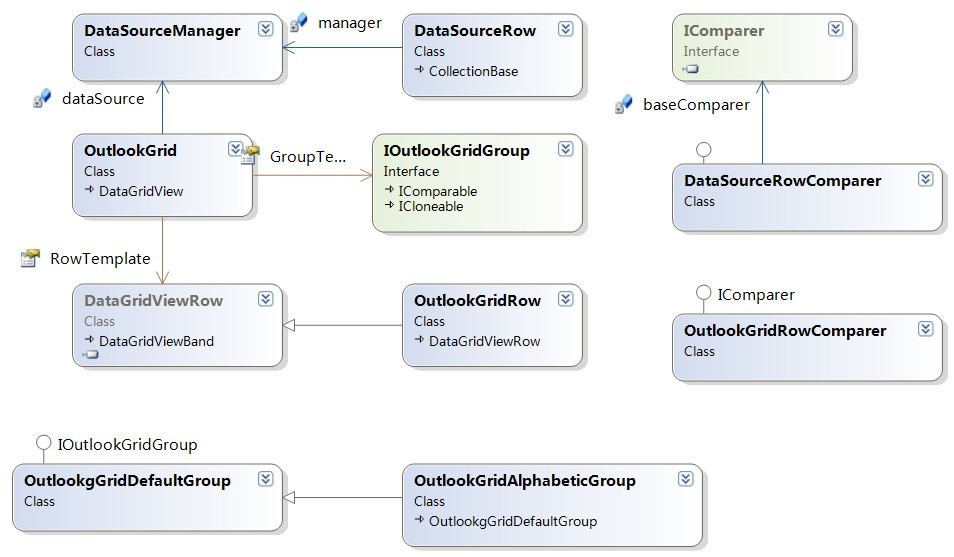
3.1 OutlookGrid类的设计
OutlookGrid类继承自DataGridView,是自定义网格组件的主体部分,下面将对其核心成员方法进行介绍。
a. 绑定数据源的方法BindData:
public void BindData(object dataSource, string dataMember) {
    this.DataMember = DataMember;
    if (dataSource == null) {
        this.dataSource = null;
        Columns.Clear();
    } else {
        this.dataSource = new DataSourceManager(dataSource, dataMember);
        SetupColumns();
        FillGrid(null);
    }
}
该方法完成了数据源的绑定功能,首先对DataSourceManager类型的数据成员dataSource进行初始化,DataSourceManager是自定义的网格组件数据管理类,将在后面的内容进行介绍,BindData方法还调用SetupColumns和FillGrid函数进行构造数据列和填充网格数据,具体的定义我们将进行介绍。
b. 设置网格组件的数据列模型:
private void SetupColumns() {
    ArrayList list;

    // clear all columns, this is a somewhat crude implementation
    // refinement may be welcome.
    Columns.Clear();

    // start filling the grid
    if (dataSource == null)
        return;
    else
        list = dataSource.Rows;
    if (list.Count <= 0) return;

    foreach (string c in dataSource.Columns) {
        int index;
        DataGridViewColumn column = Columns[c];
        if (column == null)
            index = Columns.Add(c, c);
        else
            index = column.Index;
        Columns[index].SortMode = DataGridViewColumnSortMode.Programmatic; // always programmatic!
    }

}
在进行列模型设置之前,首先调用属性Columns的Clear方法清空所有的列,然后根据数据模型dataSource成员的列数据构造新的DataGridViewColumn数据列,在调用Columns的Add方法将新建的数据列加入到列模型中。
c. 填充网格数据:
private void FillGrid(IOutlookGridGroup groupingStyle) {

    ArrayList list;
    OutlookGridRow row;

    this.Rows.Clear();

    // start filling the grid
    if (dataSource == null)
        return;
    else
        list = dataSource.Rows;
    if (list.Count <= 0) return;

    // this block is used of grouping is turned off
    // this will simply list all attributes of each object in the list
    if (groupingStyle == null) {
        foreach (DataSourceRow r in list) {
            row = (OutlookGridRow)this.RowTemplate.Clone();
            foreach (object val in r) {
                DataGridViewCell cell = new DataGridViewTextBoxCell();
                cell.Value = val.ToString();
                row.Cells.Add(cell);
            }
            Rows.Add(row);
        }
    }

    // this block is used when grouping is used
    // items in the list must be sorted, and then they will automatically be grouped
    else {
        IOutlookGridGroup groupCur = null;
        object result = null;
        int counter = 0; // counts number of items in the group

        foreach (DataSourceRow r in list) {
            row = (OutlookGridRow)this.RowTemplate.Clone();
            result = r[groupingStyle.Column.Index];
            // item is part of the group
            if (groupCur != null && groupCur.CompareTo(result) == 0)
            {
                row.Group = groupCur;
                counter++;
            } else // item is not part of the group, so create new group
            {
                if (groupCur != null)
                    groupCur.ItemCount = counter;

                groupCur = (IOutlookGridGroup)groupingStyle.Clone(); // init
                groupCur.Value = result;
                row.Group = groupCur;
                row.IsGroupRow = true;
                row.Height = groupCur.Height;
                row.CreateCells(this, groupCur.Value);
                Rows.Add(row);

                // add content row after this
                row = (OutlookGridRow)this.RowTemplate.Clone();
                row.Group = groupCur;
                counter = 1; // reset counter for next group
            }


            foreach (object obj in r) {
                DataGridViewCell cell = new DataGridViewTextBoxCell();
                cell.Value = obj.ToString();
                row.Cells.Add(cell);
            }
            Rows.Add(row);
            groupCur.ItemCount = counter;
        }
    }

}
【发表评论0条 】
网友评论(共?条评论)..
C#自定义网格组件(DataGridView)实现数据分组、排序

 CATIA/CAA
 SWING
SWING MFC
MFC Unity3D
 Android
 JQuery
 ASP.NET