
Java通过批处理命令获取MAC地址
2012-02-07 10:43:00|?次阅读|上传:wustguangh【已有?条评论】发表评论
关键词:Java, 网络通信, 操作系统|来源:唯设编程网
第二种方法,就是使用"nbtstat -a "+ip地址命令得到ip地址,该方案的原理与上面的方法相似,也是通过BufferedReader分析命令结果对应的文本内容,下面给出对应的代码:
/***
 * 通过IP地址获取MAC地址
 * @param ipAddress
 * @return
 */
public static String getMACAddress(String ipAddress) {
	String str = "", strMAC = "", macAddress = "";
	try {
		Process pp = Runtime.getRuntime().exec("nbtstat -a " + ipAddress);
		InputStreamReader ir = new InputStreamReader(pp.getInputStream());
		LineNumberReader input = new LineNumberReader(ir);
		for (int i = 1; i < 100; i++) {
			str = input.readLine();
			System.out.println(str);
			if (str != null) {
				if (str.indexOf("MAC 地址") > 1) {
					strMAC = str.substring(str.indexOf("MAC 地址") + 9,
							str.length());
					break;
				}
			}
		}
	} catch (IOException ex) {
		return "Can't Get MAC Address!";
	}
	//
	if (strMAC.length() < 17) {
		return "Error!";
	}

	macAddress = strMAC.substring(0, 2) + ":" + strMAC.substring(3, 5)
			+ ":" + strMAC.substring(6, 8) + ":" + strMAC.substring(9, 11)
			+ ":" + strMAC.substring(12, 14) + ":"
			+ strMAC.substring(15, 17);
	//
	return macAddress;
}
测试代码如下:
public static void main(String[] args) {
	System.out.println("Operation System=" + getOsName());
	System.out.println("Mac Address=" + getMACAddress());
	System.out.println("通过ip获取mac地址:" + getMACAddress("192.168.1.100"));
}
最终得到的结果如下:
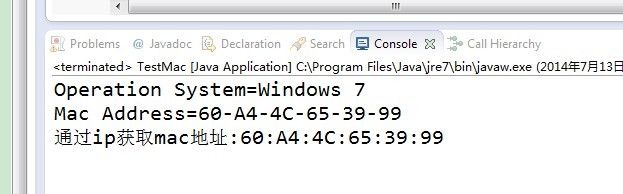
到此,我们已经得到了本机对应的MAC地址,本机的操作系统是Windows 7,语言环境为中文,其它环境也许需要进行相关调整^_^
【发表评论0条 】
网友评论(共?条评论)..
Java通过批处理命令获取MAC地址

 CATIA/CAA
 SWING
SWING MFC
MFC Unity3D
 Android
 JQuery
 ASP.NET